The AI reviewer that only tells you what matters.
Codzee reviews every pull request and merge request on GitHub, GitLab and Bitbucket within minutes. It checks each problem is real before it comments, finds security holes in your code and packages, and fixes many of them in one click.
- Reviews every pull request, when it opens, on every push, and whenever someone types
@codzee review. - Checks before it comments. A second model re-checks each finding, so you get a few real comments instead of dozens.
- Finds security problems in every review, and scans whole repositories for leaked secrets and vulnerable packages.
- Fixes in one click, with committable suggestions and upgrade pull requests for vulnerable npm, pnpm and Yarn packages.
- Flat pricing. Free for solo developers and open source. Team is $20 per developer a month.
14-day free trial · No credit card · Free for solo developers and open source
Teams write more code than ever. Review can't keep up.
AI tools help developers open more pull requests, and they wait days for a reviewer. Many AI reviewers add to the problem, burying each pull request in comments until the team stops reading them, and the one comment that mattered gets missed. Codzee is built to do the first pass well: fewer comments, each one checked, with security covered on every change.
A review takes minutes, and is checked twice.
- Pull request openedor a new push, or @codzee review
- Reads the changeplus related files and callers, through the platform's API
- Reviews itbugs, security holes, your team rules
- Checks every findinga second model re-checks; weak findings are dropped
- Commentsa summary and about 10 inline comments at most
- You reply or pushit re-reviews new commits and marks fixes as fixed
Reads beyond the diff
Opens other files and searches for callers of the code you changed, so it catches breakage outside the pull request.
Learns your team
Remembers comments you delete and explanations you accept, and skips similar findings next time.
Your own rules
Write team rules in the dashboard and mark them blocking, important or a suggestion. Blocking rules can fail the check.
Talk to it
Reply in a thread. If your explanation holds up, Codzee resolves the thread and remembers it.
Find security holes before attackers do.
Codzee checks security in two places: in every pull request it reviews, and in a Security Scan of a whole repository. A scan combines six industry scanners with an AI review, takes about a minute, and never runs your code.
Run a scan in three steps
 1
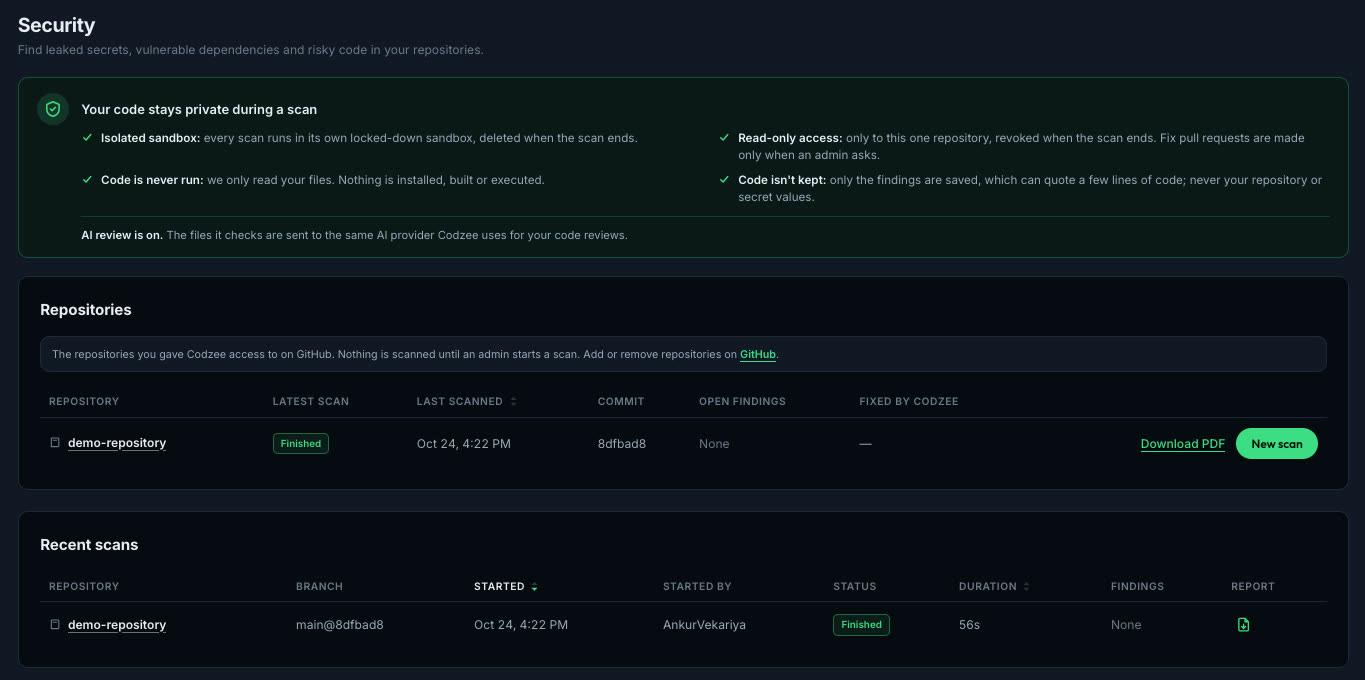
Pick a repository
Every repository you gave Codzee access to is listed. Nothing is scanned until an admin starts a scan.
 2
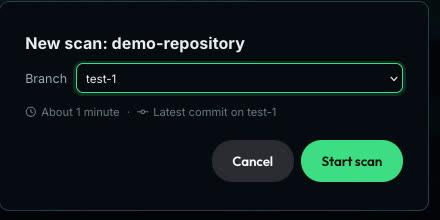
Choose a branch and start
Codzee scans the latest commit in a locked-down sandbox with read-only access. It takes about a minute.
 3
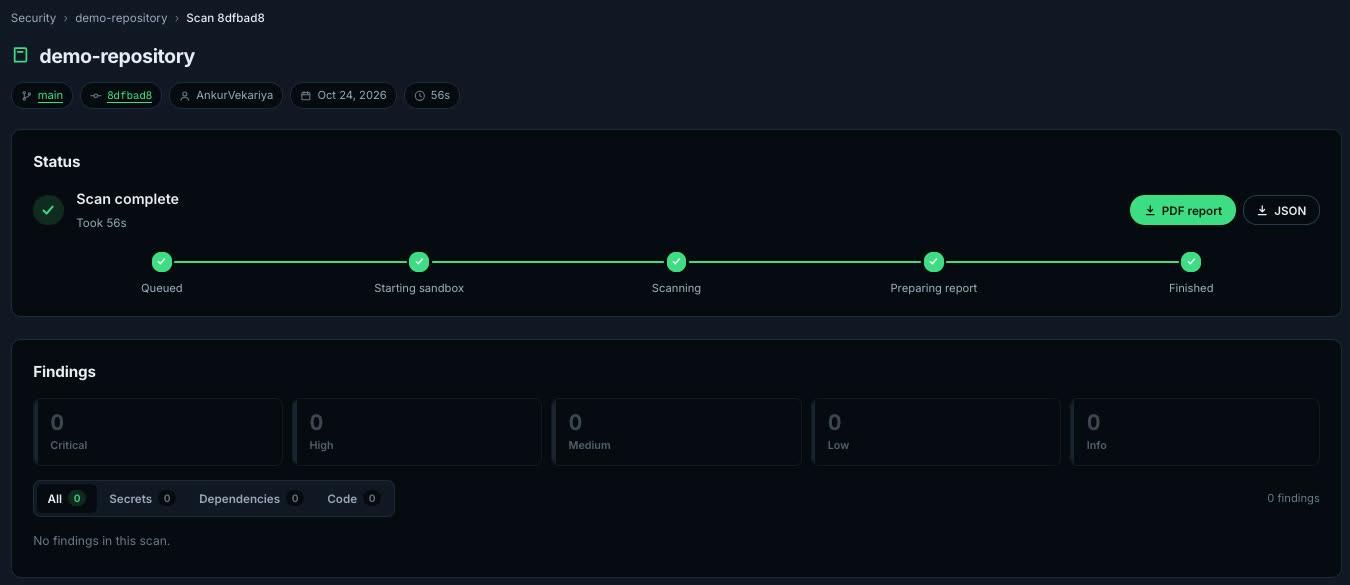
Get ranked findings and a report
Findings by severity, split into secrets, dependencies and code. Download a PDF to share, or JSON.
Six scanners, plus AI
gitleaksLeaked secretsosv-scannerVulnerable packagestrivyKnown CVEsgovulncheckGo vulnerabilities you callbanditPython code risksretire.jsOutdated JS librariesPackages in 15+ ecosystems: JavaScript, Python, Go, Rust, Java, Ruby, PHP, .NET, Dart, Elixir and more.
Every risk, ranked
Example scan of a test project- criticalDependenciesCVE in shell-quoteCVSS 9.2Fix with Codzee
- highSecretsStripe access token in source
- highDependenciesCVE in viteCVSS 7.5
- highSecretsGeneric API key, found in 10 places
Each finding is marked new, still open or fixed since the last scan.
In every pull request (all plans)
- Broken access control: role, tenant or price taken from the request, auth checks that fail open
- Account takeover risks, such as poisoned password-reset links and bypassable rate limits
- Credentials or personal data written to logs, errors or responses
- SSRF, injection, and webhook signatures checked against the wrong body
- Secrets committed in config files, and known-vulnerable dependencies
Security findings are always major or critical, never minor, and can fail the check until they're fixed.
Your code stays private during a scan
- Isolated sandbox: each scan runs in its own locked-down machine, deleted when the scan ends
- Read-only access: only to that one repository, revoked once the code is downloaded
- Code is never run: files are only read. Nothing is installed, built or executed
- Code isn't kept: only findings are saved, never your repository or secret values
Fix it, then share it
Vulnerable npm packages
Fix with Codzee opens a pull request with the nearest safe patch or minor version and an updated lockfile.
Bugs in a pull request
Committable suggestions on GitHub and GitLab, and the thread resolves itself when a push fixes it.
Leaked secrets
The exact file and line, with clear steps: rotate the credential, then remove it from history.
A PDF report to share
Summary, findings by severity, what was fixed since the last scan, with CWE and OWASP references. JSON too.
See what your users will see, before you merge.
For front-end changes, Codzee screenshots the pages a pull request touches on its preview deployment, on desktop and mobile, and puts before and after side by side in the pull request. Nothing changes in your workflow.
 1
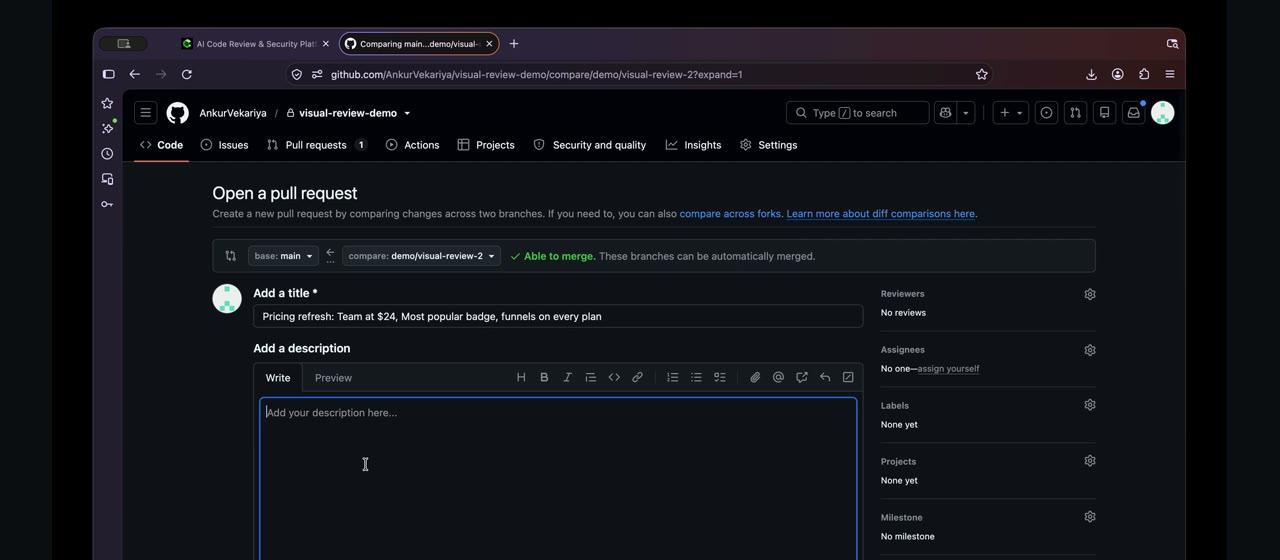
Open a pull request
Push your branch and open a pull request as usual.
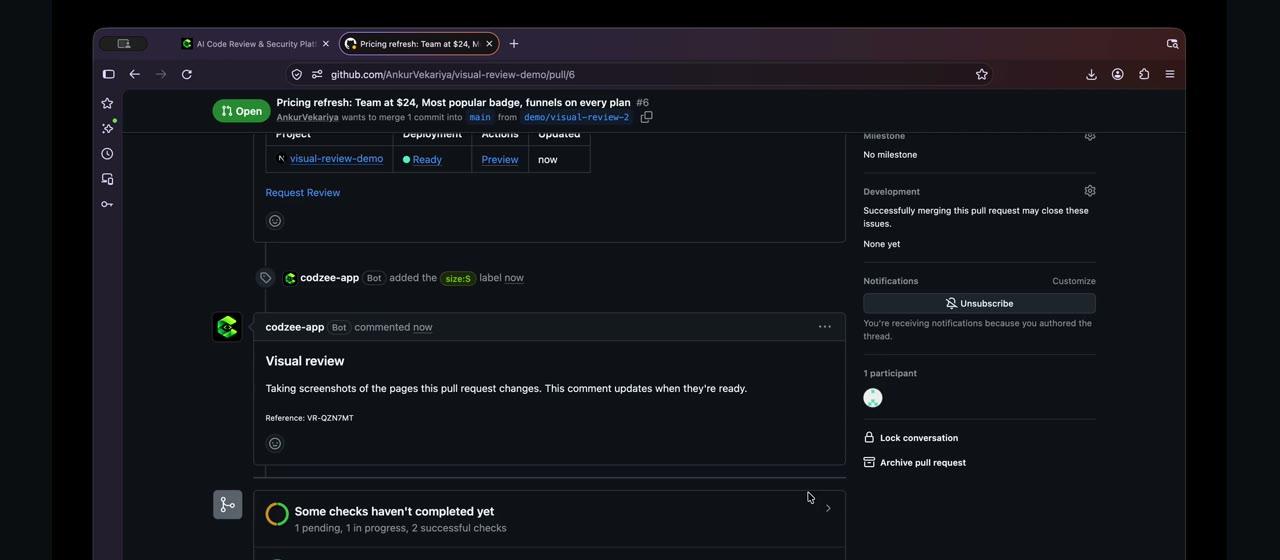 2
Codzee takes screenshots
As soon as the Vercel preview is ready, Codzee opens it in an isolated browser.
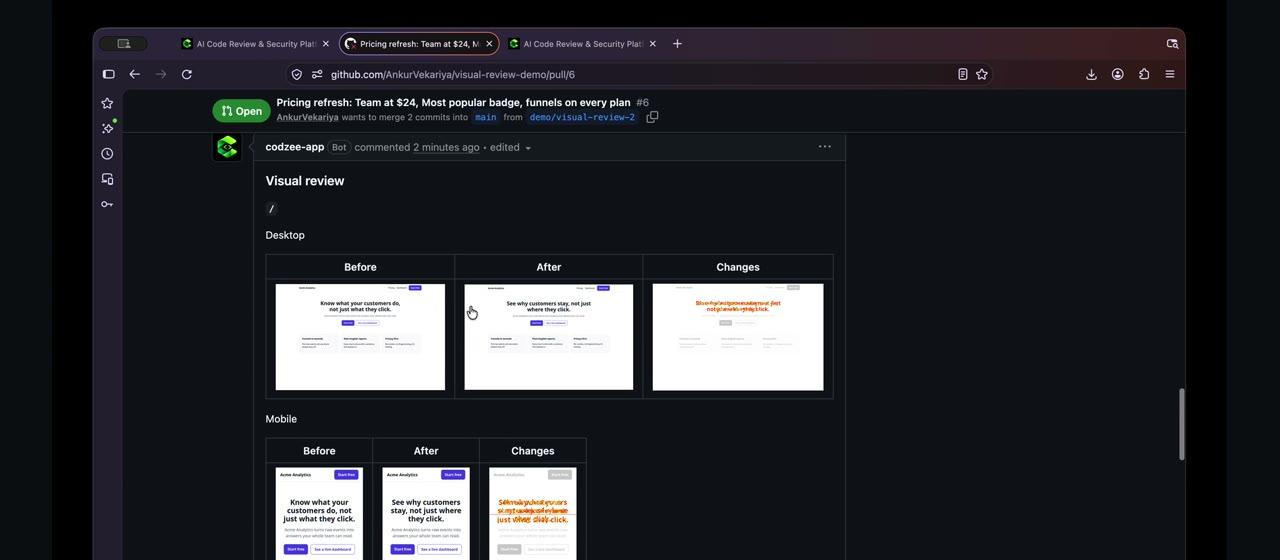 3
Before and after, side by side
A couple of minutes later, the same comment shows desktop and mobile shots.
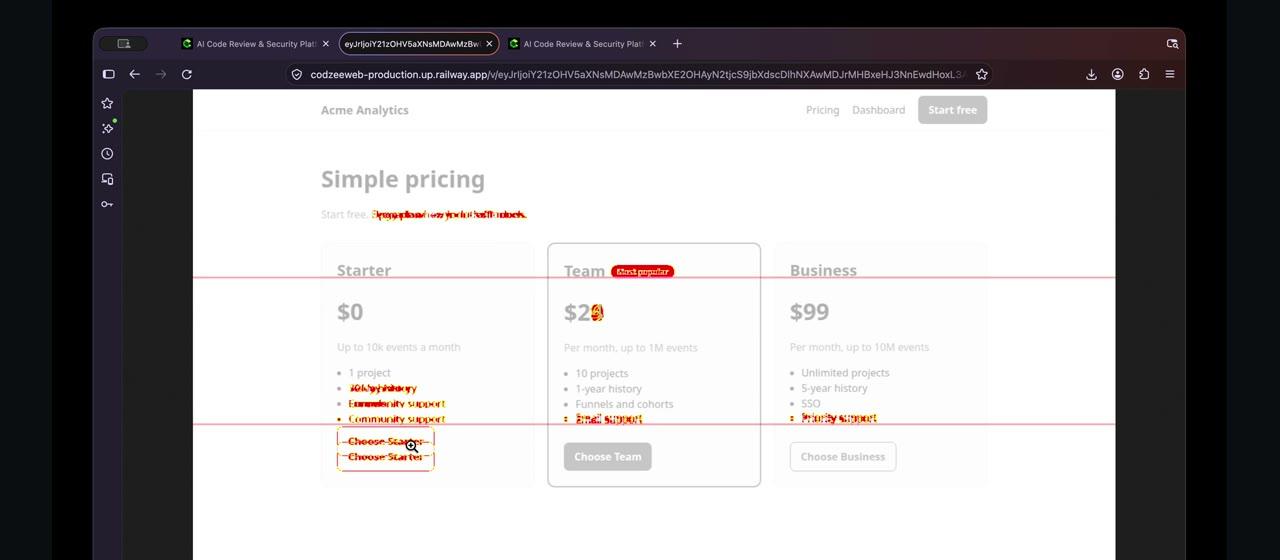 4
See exactly what moved
The changes view highlights every difference, so nothing slips through.
- Desktop (1440 × 900) and mobile (390 × 844) screenshots
- Before, after and a changes view, in the pull request
- Runs only when a change could affect a page
- Works with Vercel previews, or your own preview URL pattern
- Never blocks a merge
- Free during the beta
Codzee never stores your source code.
Code is read for the review and then thrown away. Codzee keeps the review results, asks only for the access a reviewer needs, and never runs your code.
| Codzee keeps | Codzee never keeps |
|---|---|
| Your organization, members, roles and sign-in email | Your source files or diffs |
| Repository names, settings and team rules | A clone of your repository. Reviews read files through the platform's API, and scans delete their copy when they finish |
| Review comments, findings and summaries. A comment can quote the few lines it's about | The value of any secret it finds, only a fingerprint |
| Repo memory: patterns your team dismissed and explanations you accepted | Your card details. Stripe holds those |
| Security scan findings and PDF reports | Ask Codzee conversations, only counts |
| Visual review screenshots, deleted after 90 days by default | Raw coverage uploads after 30 days |
Short-lived access
GitHub tokens expire within an hour and are never saved. Scan tokens read one repository and are revoked once the code is downloaded.
Your code never runs
Scans run in a single-use, locked-down machine that only reads files and is destroyed afterwards.
Verified and encrypted
Every webhook's signature is checked. Integration tokens are encrypted with AES-256-GCM.
No training on your code
Anthropic's Claude models, under commercial terms that exclude training on customer data.
Our cloud, your AWS, or your servers.
Codzee Cloud
Install and go. Codzee keeps only the review data described above.
Private Cloud
Runs in your own AWS account, with your own Bedrock models. Your code and data stay there.
Self-hosted
A Docker image on your servers. Nothing leaves them except an optional daily check-in with counts only.
A flat price you know in advance.
Free for solo developers and open source (30 reviewed pull requests a month). Team is $20 per developer a month, or $16 billed yearly, with 50 pull requests per developer shared by the team and security scans included. A 14-day free trial, and never an overage charge.
What is review time worth to your team?
These are example numbers. Change them to your team's.
What we're building next.
SOC 2 and SAML SSO
For teams that need them. Until then, Private Cloud and self-hosting keep your code in your own infrastructure.
Scheduled scans
Security scans that run on a schedule, as well as when you start them.
More scan coverage
Container images, infrastructure-as-code and git history, alongside source code and packages.
More one-click fixes
Fix pull requests beyond npm, pnpm and Yarn. Today every other finding comes with exact fix guidance.
Things people ask about Codzee.
Install it on one repository today.
Your next pull request gets reviewed in minutes. 14-day free trial.
14-day free trial · No credit card · Free for solo developers and open source